
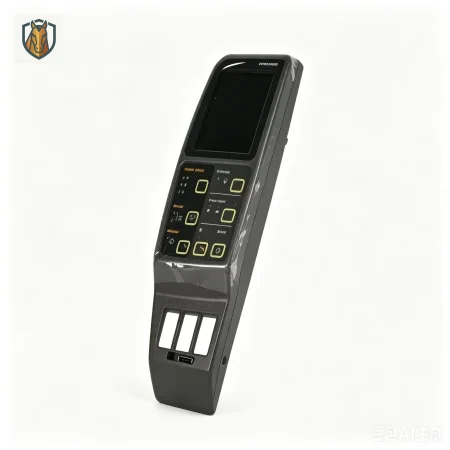
Instrument Panel Assembly 21N3-30100
Central Monitoring and Diagnostic Interface
The Hyundai 21N3-30100 Instrument Panel Assembly serves as the primary human-machine interface for the R80-7 excavator series. This dashboard cluster is responsible for the real-time acquisition and display of critical operational data, including engine RPM, coolant temperature, fuel levels, hydraulic system pressure, and essential fault diagnostic codes. As the central monitoring tool for the operator, this genuine component features high-definition visibility, shock-resistant architecture, and precise sensor signal processing to ensure accurate, stable information feedback even in the most demanding construction environments.
1. Technical Specifications
| Parameter | Detail |
|---|---|
| Part Number | 21N3-30100 |
| Component Type | Instrument Panel / Gauge Cluster |
| Primary Function | Provides real-time operational data, system alerts, and fault code diagnostics to the operator |
| Compatibility | Primarily R80-7; compatible with various R55-7, R60-7, and R110-7 series configurations (please verify connector and protocol compatibility) |
2. System Importance
The instrument panel acts as the vital communication bridge between the machine’s Electronic Control Unit (ECU) and the operator. Malfunctions in this unit can lead to:
Information Blind Spots: Failure to observe critical temperature or pressure warnings, significantly increasing the risk of catastrophic engine or pump failure.
Extended Downtime: Inability to retrieve live fault codes, which makes technical troubleshooting and repairs much more time-consuming.
Operational Inaccuracy: Loss of visibility regarding machine load and health, impacting work efficiency.
3. Maintenance and Installation Protocols
Diagnostic Indicators: If the display is blank, shows garbled text, fails to illuminate, or displays erratic values, first verify that the input voltage is stable. Inspect the rear harness connectors for signs of oxidation, moisture ingress, or loose pins.
Installation Advice: Always perform replacements with the main power disconnected to prevent electrical spikes. Ensure all harness connectors are fully seated and locked. If the new panel fails to display correctly, verify that the unit is compatible with the machine's software version.
Care Instructions: Avoid using harsh chemical solvents for cleaning the display surface to prevent coating damage. Ensure the protective sealing ring is intact to keep out construction dust and moisture.
4. Technical Support & Logistics
Supplier: Xuzhou Sinoswift Import & Export Co., Ltd.
WhatsApp: +86 13701956981
Email: [email protected]